Intro
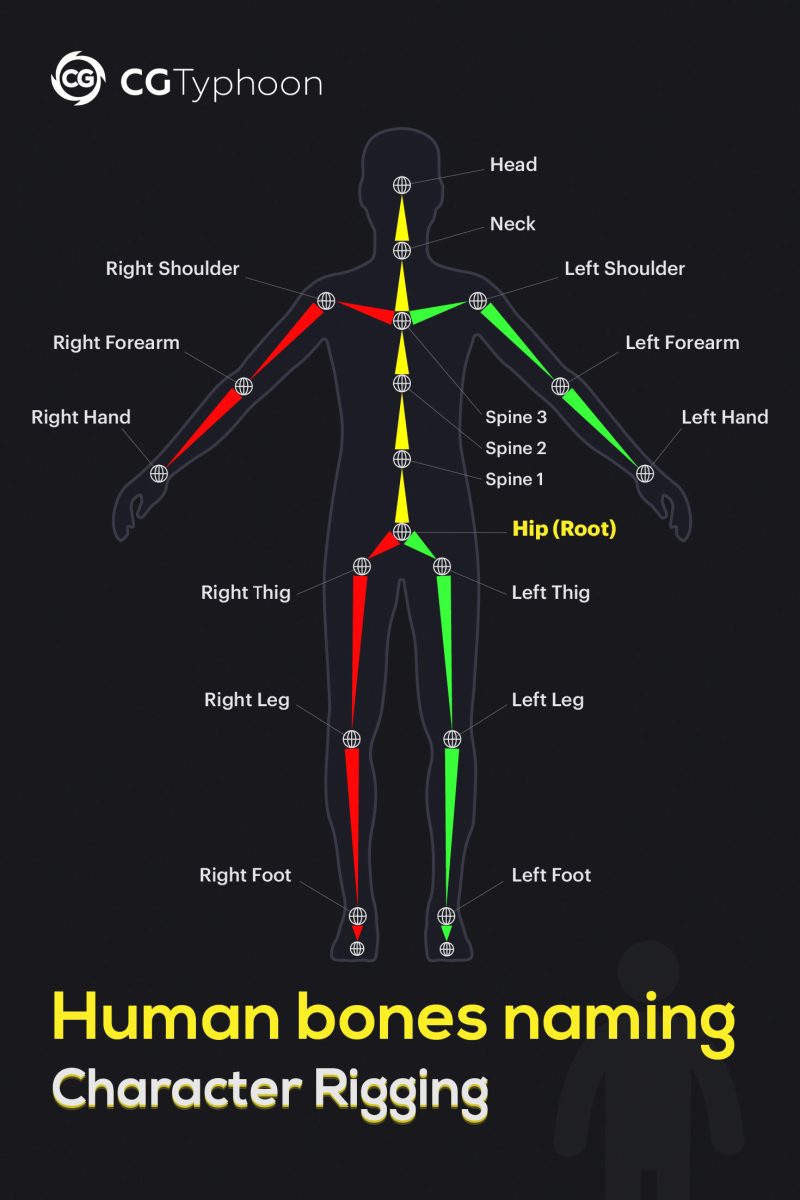
Human rig bone naming is the process of assigning clear and consistent names to the bones of a character skeleton.
Standardized bone names improve animation retargeting, compatibility between software packages, and collaboration between artists. They are commonly used in Blender, Maya, Unity, Unreal Engine, VRChat, Mixamo, and VRM character pipelines.
This guide includes a complete human rig bone names list, a standard skeleton hierarchy, production naming conventions, and platform-specific requirements for humanoid rigs.
Skeleton vs Rig in Character Animation
In character animation, a skeleton and a rig are closely related, but they are not the same thing.
A skeleton is the internal hierarchy of bones or joints inside a 3D character. It defines the body structure, joint placement, and how the main body parts are connected. In many 3D workflows, the terms “bone” and “joint” are often used interchangeably, although technically a joint is a pivot point and a bone is the segment between two joints.
A rig is the complete animation control system built on top of the skeleton. It usually includes the skeleton, animation controls, constraints, inverse kinematics (IK), forward kinematics (FK), skinning, deformation setup, helper bones, twist bones, and custom controls for animators.
💡 In simple terms, the skeleton is the character’s bone structure, while the rig is the toolset used to pose, deform, and animate that structure.
Clean bone names are important because animation tools and retargeting systems need a predictable structure. Standardized naming and humanoid mapping systems, such as Unity Humanoid, VRChat, and VRM, help software recognize body parts and apply animations or motion capture data to different characters more reliably.
Good bone naming also makes the rig easier to debug, mirror, export, retarget, and share between Blender, Maya, Unity, Unreal Engine, VRChat, Mixamo, and VRM pipelines.
Human Rig Bone Names List
The table below shows common humanoid rig bone names and their production-friendly equivalents. These names are not mandatory in every software package, but they are widely used in game-ready character rigs, animation rigs, and humanoid avatar pipelines.
| Bone Name | Common Production Rig Name | Description |
|---|---|---|
| Hips | pelvis | Root body bone and center of mass |
| Spine | spine_01 | Lower torso bone |
| Chest | spine_02 | Upper torso bone |
| UpperChest | spine_03 | Optional upper chest bone |
| Neck | neck_01 | Connects torso and head |
| Head | head | Main head bone |
| LeftShoulder | clavicle_l | Left clavicle |
| LeftUpperArm | upperarm_l | Left upper arm |
| LeftLowerArm | lowerarm_l | Left forearm |
| LeftHand | hand_l | Left hand |
| RightShoulder | clavicle_r | Right clavicle |
| RightUpperArm | upperarm_r | Right upper arm |
| RightLowerArm | lowerarm_r | Right forearm |
| RightHand | hand_r | Right hand |
| LeftUpperLeg | thigh_l | Left thigh |
| LeftLowerLeg | calf_l | Left calf |
| LeftFoot | foot_l | Left foot |
| LeftToes | ball_l | Left toe base |
| RightUpperLeg | thigh_r | Right thigh |
| RightLowerLeg | calf_r | Right calf |
| RightFoot | foot_r | Right foot |
| RightToes | ball_r | Right toe base |
Standard Human Rig Skeleton Structure
Example of a standard human rig skeleton hierarchy used in Unity, Unreal Engine, Blender, VRChat, and VRM character rigs.
root └─ pelvis ├─ spine_01 │ └─ spine_02 │ └─ spine_03 │ ├─ clavicle_l │ │ └─ upperarm_l │ │ └─ lowerarm_l │ │ └─ hand_l │ └─ clavicle_r │ └─ upperarm_r │ └─ lowerarm_r │ └─ hand_r │ ├─ thigh_l │ └─ calf_l │ └─ foot_l │ └─ ball_l │ └─ thigh_r └─ calf_r └─ foot_r └─ ball_r
💡 Note: In Unity Humanoid rigs the pelvis bone is typically mapped to the Hips slot.
This hierarchy is a simplified game-ready skeleton example. Production rigs may include extra twist bones, finger bones, facial bones, IK targets, and helper bones depending on the animation pipeline.
Blender Bone Naming Convention
In Blender, a character skeleton is stored inside an Armature, and the individual skeletal elements are called bones. For left and right body parts, Blender commonly uses .L and .R suffixes.
For example:
- upper_arm.L
- forearm.L
- hand.L
- upper_arm.R
- forearm.R
- hand.R
This naming style helps Blender recognize symmetrical bones and makes it easier to mirror, flip, and edit armatures.
Blender vs Production Bone Names
Different pipelines may use different bone naming styles for the same body parts.
| Naming Style | Example (left / right) | Common Use |
|---|---|---|
| Blender style | upper_arm.L, hand.R | Blender armatures and mirror tools |
| Production / game style | upperarm_l, hand_r | Unity, Unreal Engine, Maya, VRChat, VRM, FBX pipelines |
| Humanoid slots | Left Upper Arm, Right Hand | Unity Humanoid, VRChat, and VRM mapping |
The important thing is to understand the difference between a bone name and a humanoid slot.
A bone name is the actual name inside your Blender armature or FBX file, such as upperarm_l, lowerarm_l, or hand_l.
A humanoid slot is the body-part field used by systems like Unity Humanoid, VRChat, or VRM. For example, upperarm_l can be mapped to the Left Upper Arm slot, and hand_l can be mapped to the Left Hand slot.
So your bones do not always need to be named exactly like Unity or VRChat slots. However, clean and predictable names make the rig easier to mirror, export, retarget, debug, and share between different tools.
If the character will stay mostly inside Blender, .L and .R names are convenient. If the character is prepared for a game engine or FBX pipeline, _l and _r names are often easier to keep consistent.
Unity Humanoid Bone Names
Unity Humanoid uses a standardized Avatar Mapping system that allows animations to be retargeted between different character rigs. Unlike Generic rigs, Humanoid avatars do not require specific bone names as long as the skeleton can be correctly mapped to Unity’s humanoid bone slots.
During avatar setup, Unity assigns your rig bones to predefined slots such as Hips, Spine, Chest, Head, Upper Arm, Lower Arm, Hand, Upper Leg, and Foot. Once the mapping is completed, the character can use any Humanoid-compatible animation.
Unity Humanoid Avatar Bone Mapping
The Unity Humanoid Avatar system uses predefined bone slots rather than requiring exact bone names.
Required Unity Humanoid Slots
The following bone slots are required for a valid Unity Humanoid avatar and animation retargeting.
| Humanoid Slot | Required |
|---|---|
| Hips | ✅ Yes |
| Spine | ✅ Yes |
| Head | ✅ Yes |
| Left / Right Upper Arm | ✅ Yes |
| Left / Right Lower Arm | ✅ Yes |
| Left / Right Hand | ✅ Yes |
| Left / Right Upper Leg | ✅ Yes |
| Left / Right Lower Leg | ✅ Yes |
| Left / Right Foot | ✅ Yes |
Optional Unity Humanoid Slots
While not always required, these bones improve animation quality and support additional Humanoid features.
| Humanoid Slot | Purpose |
|---|---|
| Chest | Better torso animation |
| Upper Chest | Additional spine control |
| Neck | Improved head movement |
| Eyes | Eye tracking |
| Jaw | Facial animation |
| Fingers | Hand animation |
| Toes | Better foot roll |
Unity Bone Mapping Example
A typical production rig can use completely different bone names while still being recognized as a Unity Humanoid avatar.
pelvis → Hipsspine_01 → Spinespine_02 → Chesthead → Headupperarm_l → Left Upper Armhand_l → Left Hand
This is only a short mapping example. A full bone list is provided in the Human Rig Bone Names List section above.
Unity Humanoid Bone Naming Tips
💡 Unity does not require exact bone names such as “Hips” or “LeftUpperArm”. The important part is assigning the correct bones during Avatar Configuration.
For example, pelvis can be mapped to Hips, spine_01 to Spine, and clavicle_l to Left Shoulder without any issues.
VRChat Bone Names
VRChat avatars use Unity’s Humanoid rig system, so VRChat does not require a separate bone naming convention. The most important part is that the avatar skeleton is correctly mapped as a Humanoid avatar inside Unity.
This means that production bone names such as pelvis, spine_01, upperarm_l, hand_l, thigh_l, and foot_l can work in VRChat as long as they are assigned to the correct Unity Humanoid slots.
VRChat Avatar Bone Setup
For a VRChat avatar, focus on correct humanoid mapping first and clean production names second. The main body bones should be easy to identify, correctly parented, and assigned to the right Unity Humanoid slots.
A practical VRChat-ready skeleton usually includes:
| Bone Area | Example Production Names | Why It Matters |
|---|---|---|
| Body root | pelvis | Main body control and humanoid hips mapping |
| Spine | spine_01, spine_02, spine_03 | Torso motion and upper body tracking |
| Head | neck_01, head | Head movement and viewpoint stability |
| Arms | clavicle_l(r), upperarm_l(r), lowerarm_l(r), hand_l(r) | Arm movement, gestures, and IK |
| Legs | thigh_l(r), calf_l(r), foot_l(r), ball_l(r) | Locomotion, foot placement, and full-body tracking |
| Fingers | thumb_01_l(r), index_01_l(r), middle_01_l(r) | Hand gestures and hand poses |
Clear production names make the avatar easier to debug in Unity, especially when checking Humanoid Avatar Configuration, hand gestures, full-body tracking, and animation retargeting.
Optional VRChat Bones for Better Animation
While the main Humanoid mapping is the most important part, additional bones can improve avatar movement, gestures, tracking, and facial features.
| Bone Type | Why It Matters in VRChat |
|---|---|
| Shoulders / Clavicles | Improve arm movement and shoulder deformation |
| Chest / Upper Chest | Improves torso movement and upper body tracking |
| Neck | Helps stabilize head and upper body motion |
| Full finger bones | Improves hand gestures and hand poses |
| Eye bones | Used for eye look and avatar expression systems |
| Jaw bone | Useful for mouth movement and facial animation |
| Toes / Ball bones | Improve foot roll and full-body tracking movement |
| Twist bones | Help reduce deformation problems in arms and legs |
VRChat Bone Naming Tips
VRChat does not care whether your FBX bones are named exactly Hips, LeftUpperArm, or LeftHand. What matters is that the bones are correctly assigned in Unity’s Humanoid Avatar Configuration.
However, clear production names such as pelvis, spine_01, upperarm_l, lowerarm_l, hand_l, thigh_l, calf_l, and foot_l make the rig easier to debug, edit, and share with other artists.
💡 Note: In VRChat and Unity, left and right bones are named from the avatar’s perspective, not from the viewer’s perspective.
VRM Humanoid Bone Names
VRM avatars use a standardized humanoid structure, similar to Unity Humanoid and VRChat avatars. The exact FBX bone names can vary, but the bones must be correctly assigned to humanoid body slots.
A VRM-ready character can use clean production bone names such as pelvis, spine_01, spine_02, neck_01, head, upperarm_l, lowerarm_l, hand_l, thigh_l, calf_l, foot_l, and ball_l.
VRM Humanoid Mapping Example
| Production Bone Name | VRM / Humanoid Slot |
|---|---|
| pelvis | Hips |
| spine_01 | Spine |
| spine_02 | Chest |
| spine_03 | Upper Chest |
| neck_01 | Neck |
| head | Head |
| upperarm_l / upperarm_r | Left / Right Upper Arm |
| lowerarm_l / lowerarm_r | Left / Right Lower Arm |
| hand_l / hand_r | Left / Right Hand |
| thigh_l / thigh_r | Left / Right Upper Leg |
| calf_l / calf_r | Left / Right Lower Leg |
| foot_l / foot_r | Left / Right Foot |
| ball_l / ball_r | Left / Right Toes |
For VRM avatars, consistent naming is especially useful when preparing VTuber models, motion capture workflows, facial expressions, spring bones, and cross-application humanoid animation.
Hand and Finger Bone Names
Finger bones are not always required for a basic humanoid rig, but they are important for hand animation, VRChat gestures, VRM avatars, motion capture cleanup, and expressive character posing.
A common production naming convention uses three bones per finger: base, middle, and tip.
| Finger | Left Hand Production Names | Right Hand Production Names |
|---|---|---|
| Thumb | thumb_01_l, thumb_02_l, thumb_03_l | thumb_01_r, thumb_02_r, thumb_03_r |
| Index | index_01_l, index_02_l, index_03_l | index_01_r, index_02_r, index_03_r |
| Middle | middle_01_l, middle_02_l, middle_03_l | middle_01_r, middle_02_r, middle_03_r |
| Ring | ring_01_l, ring_02_l, ring_03_l | ring_01_r, ring_02_r, ring_03_r |
| Little / Pinky | pinky_01_l, pinky_02_l, pinky_03_l | pinky_01_r, pinky_02_r, pinky_03_r |
Some pipelines use little instead of pinky, or proximal, intermediate, and distal instead of “01”, “02”, and “03”. The exact naming style can vary, but the most important rule is consistency.
For example, do not mix thumb_01_l, index_proximal_L, and middle1Left in the same rig unless your pipeline specifically requires it.
Frequently Asked Questions
What is the root bone in a human rig?
The root bone is the highest bone in a character rig hierarchy and is usually positioned at the world origin (0,0,0). It acts as the parent of the entire skeleton and controls the overall movement of the character through space, often referred to as root motion.
In most game-ready character rigs, the root bone sits above the pelvis (hips) bone and serves as the starting point for the entire skeleton hierarchy.
What is the difference between Hips and Pelvis in a rig?
In most humanoid rigs, Hips and Pelvis refer to the same central body bone and are often used interchangeably. This bone represents the character’s center of mass and serves as the connection point between the spine and both legs.
Game engines may use different naming conventions. For example, Unity Humanoid uses the term Hips, while many production rigs and animation systems use Pelvis. Despite the naming difference, they usually represent the same skeletal joint.
Why do rigs use _l and _r suffixes?
_l and _r suffixes are used to identify left and right side bones within a character skeleton. For example, upperarm_l represents the left upper arm, while upperarm_r represents the right upper arm.
These naming conventions help animation software automatically mirror poses, retarget animations, and simplify rigging workflows. Left and right sides are always named from the character’s perspective rather than the viewer’s perspective.
What are ball bones in a character rig?
named ball_l and ball_r.What are twist bones?
Twist bones are auxiliary bones used to distribute rotation along a limb, helping to prevent mesh deformation during animation. They are commonly placed in the forearms, upper arms, thighs, and calves.
Without twist bones, rotating a wrist or shoulder can cause the mesh to collapse or create the well-known “candy-wrapper” deformation effect. By spreading the rotation across multiple joints, twist bones improve skinning quality and produce smoother character deformations in game engines and animation software such as Blender, Maya, Unreal Engine, and Unity.
What are the required bones for a Unity Humanoid rig?
The essential Humanoid slots are Hips, Spine, Head, Left and Right Upper Arms, Left and Right Lower Arms, Left and Right Hands, Left and Right Upper Legs, Left and Right Lower Legs, and Left and Right Feet.
Additional bones such as Chest, Upper Chest, Neck, Shoulders, Toes, Fingers, Eyes, and Jaw are optional, but they are recommended for better animation quality, hand poses, facial animation, foot roll, and compatibility with more humanoid animation features.
Unity does not always require the FBX bones to have exact names like Hips or LeftUpperArm. The important part is that the correct bones are assigned to the correct Humanoid slots during Avatar Configuration.
What bone names are required for VRChat avatars?
For a functional VRChat avatar, the main body bones should be assigned to the correct Humanoid slots: Hips, Spine, Head, Left and Right Arms, Left and Right Hands, Left and Right Legs, and Left and Right Feet.
Production bone names such as pelvis, spine_01, upperarm_l, lowerarm_l, hand_l, thigh_l, calf_l, and foot_l can work correctly in VRChat as long as they are mapped to the proper Unity Humanoid slots.
For better VRChat animation quality, full-body tracking, and hand gestures, it is also recommended to include Chest, Neck, Shoulder or Clavicle bones, Finger bones, Eye bones, Jaw bone, and Toe or Ball bones.
What is the standard bone naming convention for character rigs?
pelvis, spine_01, spine_02, clavicle_l, upperarm_l, lowerarm_l, hand_l, thigh_r, calf_r, and foot_r.
Consistent naming conventions make rigs easier to animate, retarget, debug, and share between different software packages such as Blender, Maya, Unity, Unreal Engine, and VRChat.
What is the difference between a skeleton and a rig?
A skeleton is the hierarchy of bones or joints inside a character. It defines the body structure, joint placement, and how the main body parts are connected.
A rig is the complete animation control system built on top of the skeleton. It may include controllers, constraints, inverse kinematics (IK), forward kinematics (FK), skinning, helper bones, twist bones, and custom animation controls.
In simple terms, the skeleton is the character’s bone structure, while the rig is the toolset animators use to pose, deform, and animate the character.
Do Unity, VRChat, and VRM require exact bone names?
For example, a bone named pelvis can be mapped to Hips, upperarm_l can be mapped to Left Upper Arm, and hand_l can be mapped to Left Hand. Clean names still help with automatic mapping, debugging, retargeting, and exporting.
What are VRM humanoid bone names?
Your actual production bones can still use names like pelvis, spine_01, upperarm_l, hand_l, thigh_l, and foot_l as long as they are correctly mapped to the VRM humanoid structure.
How should finger bones be named in a character rig?
01, 02, and 03. For example, the left index finger can be named index_01_l, index_02_l, and index_03_l.
Some pipelines use anatomical names such as proximal, intermediate, and distal. Both systems can work, but the naming style should stay consistent across all fingers and both hands.